How AI Coding Assistants Differ From Traditional Code Editors
84% of developers now use an AI coding tool, but only 29% trust the code it produces. Here's what actually changed between a text editor with autocomplete and an assistant that edits your codebase on its own.
The ComparedStack Team · September 12, 2026 · 6 min read
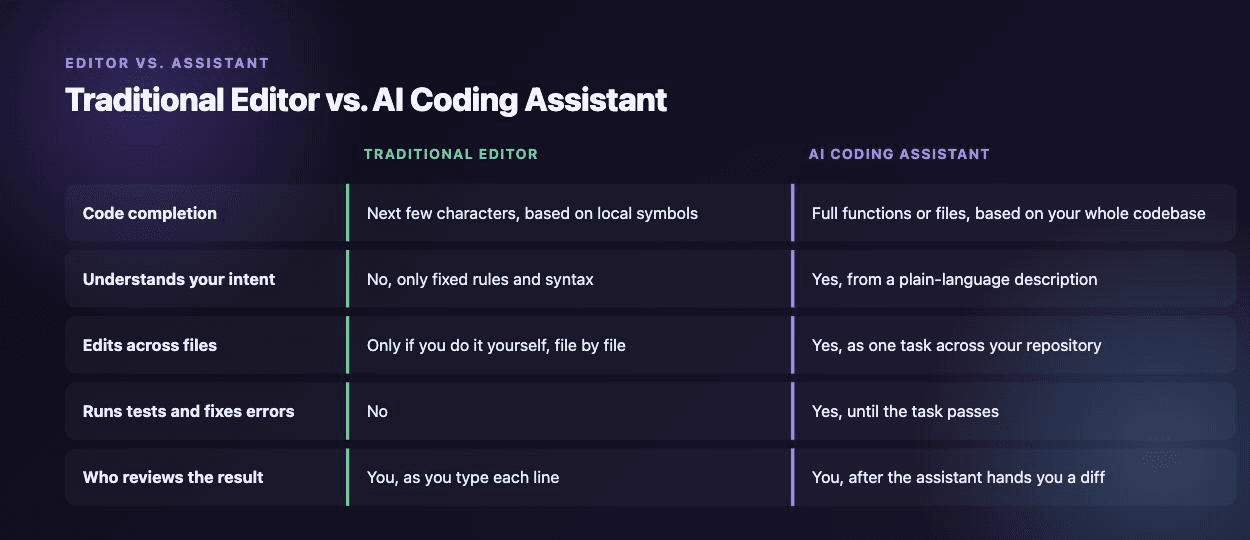
A traditional code editor waits for you. You open a file, type, and it highlights your syntax and suggests the next few characters based on what's already there. An AI coding assistant does more than that. You describe a task in plain language, and it reads your codebase, edits multiple files, runs your tests, and fixes the errors it introduces along the way.
Developers have picked this up fast. AI coding tool adoption hit 84% in 2026, up from 76% two years earlier, according to Stack Overflow's developer survey. Adoption and trust aren't the same thing, though. Only 29% of developers say they trust AI-generated code to be accurate, down from 40% the year before. That gap matters: these tools do more, and you still need to check their work.
What a traditional editor actually does
Editors like VS Code, Vim, and JetBrains's IDEs give you syntax highlighting, static analysis, and autocomplete built from your project's own symbols. Type "user." and the editor shows you the methods and properties that exist on that object, because it parsed your code and knows what's there. It can rename a variable across your project or extract a function into its own file. All of that runs on fixed rules, not judgment.
None of it reads your intent. A traditional editor won't tell you that your new function duplicates one written three files away, and it won't touch a second file unless you tell it to, one keystroke at a time. You write every line, and you decide every change.
What an AI coding assistant adds
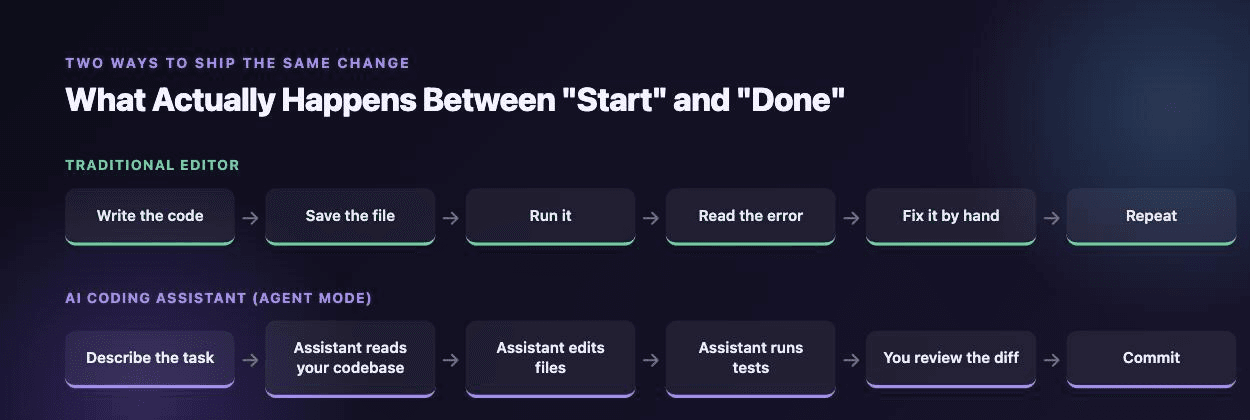
GitHub Copilot now ships three separate modes: Ask, Edit, and Agent. Ask mode answers questions about your code without changing anything. Edit mode takes a description of what you want and proposes a diff across a few files for you to review. Agent mode goes further: you give it a goal, and it plans the work, edits files across your repository, runs terminal commands, reads the output, and fixes its own mistakes until the task passes.
Cursor and Claude Code take different approaches to the same idea. Cursor is a full editor built on VS Code, with AI built into every screen you already use. Claude Code has no editor interface. You run it from your terminal, and it reads your whole project, plans a set of edits, and executes them without you directing each step. Claude's models can hold over 200,000 tokens of context, enough to reason across an entire mid-sized repository at once, and Anthropic's larger models go past a million.
The trust gap you still have to manage
Only 3% of developers say they highly trust AI-written code. That number should shape how you use these tools. Read every diff an agent produces before you merge it. Run your own tests even after the assistant says its tests passed. Check anything touching authentication, payments, or data deletion by hand. The tools got faster. Your review process shouldn't get shorter.
Which one to use, and when
For small, local changes, autocomplete and edit-mode tools are faster than describing the task in a prompt. Typing a function signature and accepting a suggestion takes less time than writing a paragraph explaining what you want. Save agent mode for work that spans multiple files: a new feature that touches a model, a controller, and a test suite, or a refactor that renames something used across forty files. Planning and executing a change like that saves you real time.
Most developers already split their tools this way. An inline assistant like Copilot handles day-to-day typing, and a separate agent, Claude Code, Cursor's agent mode, or something similar, handles the larger jobs. Running both isn't wasteful. It matches the tool to the size of the task.
Bottom line
A traditional editor is a tool you operate. An AI coding assistant is a tool you direct. The first waits for your next keystroke. The second can take a goal, touch a dozen files, and hand you a working change to review. That shift already happened: 84% of developers use these tools now. The trust numbers show developers are still reviewing the code themselves, just at a different point in the process.